Components
Apache Superset is not a single process. A working deployment is a small set of cooperating services: a web application that users hit, a metadata database that stores dashboards and users, and optional workers, cache, and sidecar processes that unlock async queries, alerts, reports, and AI clients.
This page maps those components and how they talk to each other. Use it as a mental model before you install or scale.
Video walkthrough
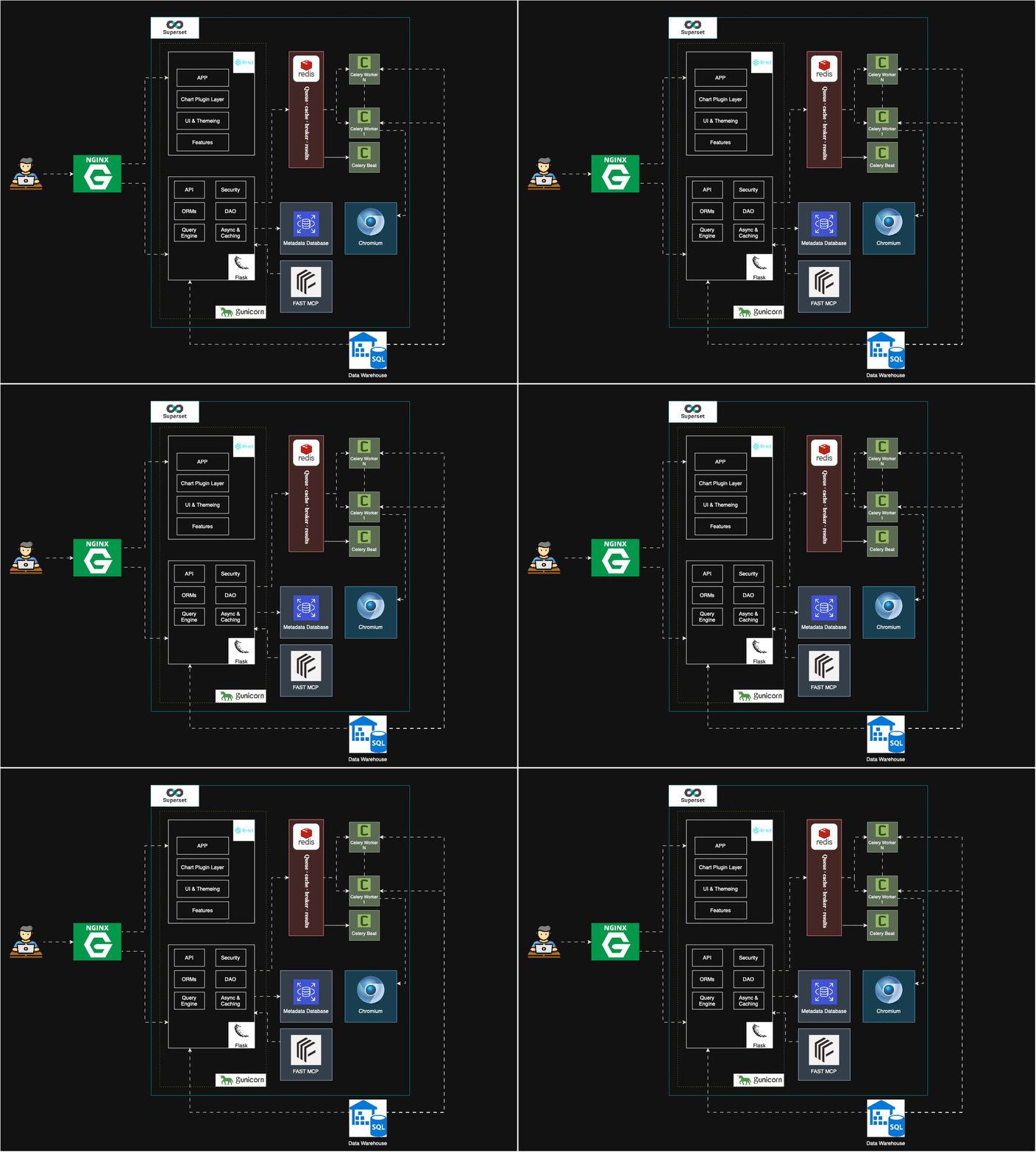
The component list matches the official Superset architecture docs. The diagram below also includes Chromium (for pixel-perfect reports) and the MCP server documented elsewhere on this site.
Component diagram
Core components
1. Superset application
This is the process users open in a browser. Typical production setup: Gunicorn serving the Flask backend, with a Webpack-built React UI as static assets. In the Diagram React + Flask. React is used for frontend it is built and placed in Flask. Hence Only one application is needed to be running via gunicorn.
What happens on a chart load:
- The UI requests chart metadata from the API.
- The backend compiles SQL from the dataset, metrics, and filters.
- SQLAlchemy (plus a database engine spec) runs that SQL against your warehouse.
- Results are returned as a visualization, often after a cache lookup.
The app is stateless. Session and metadata live in cookies and the metadata database, so you can put several web processes behind a load balancer.
2. Metadata database
Not your warehouse this database is used by superset to run the application properly. This database stores:
- Users, roles, and permissions
- Database connections, datasets, charts, dashboards
- Logs, alerts, and report definitions
Superset is tested with PostgreSQL and MySQL. SQLite (default on some PyPI/quickstart paths) and Docker Compose volume databases are fine for exploration, not production. Back this database up.
Related: Postgres setup in the Celery guide.
3. Caching layer (usually Redis)
Optional for a minimal UI, required for several features. Redis typically does two jobs:
| Role | Why it matters |
|---|---|
| Query result cache | A dashboard opened twice should not hit the warehouse twice |
| Celery broker | Workers pull async jobs (SQL Lab, reports, thumbnails) from a queue |
You can use other cache backends such as valkey, Redis is the common choice.
4. Worker and beat (Celery)
Optional processes, required for async and scheduled work:
- Worker — runs long SQL Lab queries, screenshot jobs, emails, and similar background tasks
- Beat — a scheduler that enqueues periodic alerts and reports
Related: Celery configuration, Alerts and Reports.
Optional components that show up in real deployments
Headless Chromium
Alerts and reports that email a dashboard screenshot need a browser. Superset drives headless Chromium to log in, render the dashboard, and capture it. Without Chromium (and a working worker), scheduled PDF/PNG reports will fail even if Celery is running.
Related: Chromium configuration.
MCP server
The Model Context Protocol server is a separate process (superset mcp run, typically port 5008). AI clients such as Claude and Cursor call tools like list_dashboards against it. It reads the same superset_config.py and metadata database as the web app.
Related: MCP overview, PyPI MCP setup, HS256 auth.
Reverse proxy / HTTPS
Put nginx, Traefik, or a cloud load balancer in front of Gunicorn for TLS, gzip, and sticky-free load balancing. The web app still talks to Redis, Postgres, and warehouses on the private network.
Data warehouses
These are not the metadata DB. Superset queries them live through SQLAlchemy dialects (PostgreSQL, Snowflake, BigQuery, Trino, Redshift, and others). Workers use the same connections for async SQL and reports.
What you need for which features
| Feature | Web app | Metadata DB | Redis | Celery worker + beat | Chromium | MCP |
|---|---|---|---|---|---|---|
| Browse dashboards and explore charts | Required | Required | Recommended | — | — | — |
| Fast repeated dashboard loads | Required | Required | Required | — | — | — |
| Async SQL Lab / long queries | Required | Required | Required | Required | — | — |
| Alerts and emailed reports | Required | Required | Required | Required | Required | — |
| AI clients (Claude, Cursor) | Recommended | Required | — | — | — | Required |
Docker Compose and Kubernetes installs typically start the web app, Postgres, Redis, worker, and beat together. A PyPI install starts only the application until you add Redis, Celery, Chromium, and MCP yourself.
Request paths (short version)
Interactive chart
Browser → (proxy) → web app → cache? → warehouse → chart
Scheduled report
Beat → Redis queue → worker → Chromium renders dashboard via web app → email/Slack
AI tool call
Claude/Cursor → MCP :5008 → JWT/auth → metadata DB / warehouse → tool result
Where to go next
- Install the web app: Quickstart or PiPy
- Add Redis and workers: Celery
- Turn on screenshots: Chromium and Alerts and Reports
- Connect AI clients: MCP